---
title: The Home Screen
description: The Home page is the starting point for everyone when they log in to iComply.
---
[Skip to content](https://support.icomplyis.com/en/homepage#main-content)
[](https://www.icomplyis.com/)
- [Home](https://support.icomplyis.com/en/icomply-mission-control)
- Coverage
- Procedures
- Technical
- Legal
- About Us
Open main navigation
Close main navigation
- [Home](https://support.icomplyis.com/en/icomply-mission-control)
- Coverage
- Procedures
- Technical
- Legal
- About Us
- [Contact Sales](https://icomplyis.com/pricing/book-demo/)
[Contact Sales](https://icomplyis.com/pricing/book-demo/)
Hello. How can we help you?
- There are no suggestions because the search field is empty.
1. [iComply Knowledge Base](https://support.icomplyis.com/en?hsLang=en)
2. [Platform User Manual](https://support.icomplyis.com/en/platform-user-manual?hsLang=en)
3. [General](https://support.icomplyis.com/en/platform-user-manual?hsLang=en#general)
May 4, 2026
# The Home Screen
## The Home Screen is the starting point for everyone when they log in to iComply.
The Home Screen provides an overview of Recent Activities, Open Cases, Summary, Personal Settings, Knowledge Base, and a Support Chatbox.
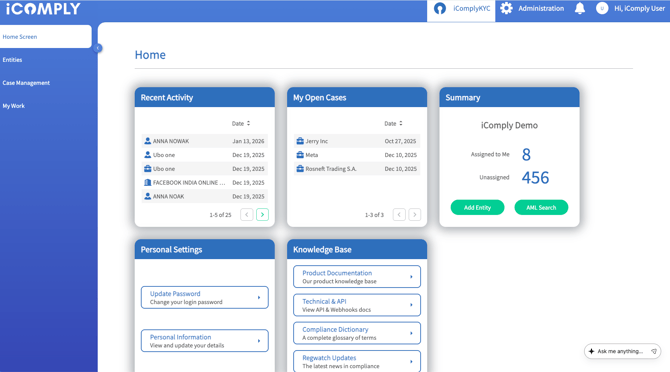
**Recent Activity** - provides a summary of recently saved updates, additions, deletions or changes to any records.

**My Open Cases** - Provides the number of cases that have been assigned and for you to address.

**Summary** - The Summary section provides the details of the number of KYC profiles that have been assigned to you to review as well as the number of unassigned profiles. You As have the ability to quick-add an Entity or Case from this section.

**Personal Settings** - Quick links to Update Password and Personal Information sections.

**Knowledge Base** - Quick links to access Product Documentation, Technical & API, Compliance Dictionary, and Regwatch Updates.

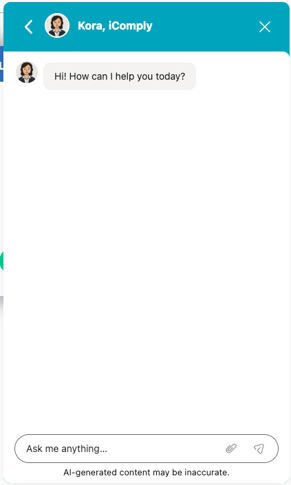
**Support Chat Box**- At the bottom of the home screen you will see a chat box to contact the iComply Support team and ask any questions.
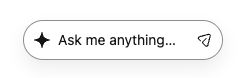
Clicking this button will expand the chat box to open.
- [Getting Starting](https://support.icomplyis.com/en/getting-starting?hsLang=en#main-content)
- [Introduction](https://support.icomplyis.com/en/getting-starting?hsLang=en#introduction)
- [Platform User Manual](https://support.icomplyis.com/en/platform-user-manual?hsLang=en#main-content)
- [General](https://support.icomplyis.com/en/platform-user-manual?hsLang=en#general)
- [Platform Overview](https://support.icomplyis.com/en/platform-user-manual?hsLang=en#platform-overview)
- [KYC Module](https://support.icomplyis.com/en/platform-user-manual?hsLang=en#kyc-module)
- [AML Module](https://support.icomplyis.com/en/platform-user-manual?hsLang=en#aml-module)
- [Administration](https://support.icomplyis.com/en/platform-user-manual?hsLang=en#administration)
- [Portals](https://support.icomplyis.com/en/platform-user-manual?hsLang=en#portals)
- [FAQ](https://support.icomplyis.com/en/platform-user-manual?hsLang=en#faq)
- [Compliance](https://support.icomplyis.com/en/platform-user-manual?hsLang=en#compliance)
- [Security & Privacy](https://support.icomplyis.com/en/platform-user-manual?hsLang=en#security-privacy)
- [Quick Start Guides](https://support.icomplyis.com/en/quick-start-guides?hsLang=en#main-content)
- [Regulatory Resources](https://support.icomplyis.com/en/quick-start-guides?hsLang=en#regulatory-resources)
- [Training Library](https://support.icomplyis.com/en/training-library?hsLang=en#main-content)
- [Compliance Education Center](https://support.icomplyis.com/en/training-library?hsLang=en#compliance-education-center)
- [REST API Documentation](https://support.icomplyis.com/en/rest-api-documentation?hsLang=en)
- [FAQs](https://support.icomplyis.com/en/faqs?hsLang=en#main-content)
- [Support](https://support.icomplyis.com/en/faqs?hsLang=en#support)
- [Product](https://support.icomplyis.com/en/faqs?hsLang=en#product)
[](https://www.iComplyis.com/)
Trust In Every Transaction
www.icomplyis.com
Copyright © 2025, All Rights Reserved, iComply Investor Services Inc